Client
MasterBorn
Country
Poland
Type
Recruitment task
Timeline
Sep 2026
HotelManager PRO
An internal tool for small and medium-sized hotels and guesthouses, used daily by receptionists and owners to manage reservations and occupancy.

Project Overview
Design challenge. The recruitment task was to redesign and improve an existing reservation system for small accommodation providers in response to identified usability issues. It had to be completed within four hours using any AI tools of choice, submitted as a link to a working prototype, and followed by a presentation of the outcomes.
Project requirements
To keep the users in mind: receptionists work under time pressure, while owners need a quick overview of occupancy.
To demonstrate orchestrating an AI-assisted workflow, enforcing corrections, and justifying my design decisions.
My role
UX/UI Designer
Responsibilities
Analyzing the existing reservation system
Identifying and categorizing usability issues
Defining the core design problem
Redesigning the existing screen
Presenting the outcomes of my work to the recruitment team
Analysis
Where does the screen fail its users? At this stage, the task was to identify usability issues that make it difficult for receptionists to quickly find an available room for a walk-in guest or check the hotel's current occupancy. It also involved assessing which elements of the screen were illogical and which were merely unappealing visually.
Current design


Problems
Logical issues:
Primary action: "+ NEW RESERVATION" is disconnected from its context (the table)
Filter labels: the labels of the checkboxes and dropdown above the table are placed too far from them visually. It is unclear which label belongs to which checkbox, and the dropdown label is also confusingly distant from its control
Date fields: no date picker appears after clicking the "From:" and "To:" fields, so receptionists have to enter dates manually, which is time-consuming
Pagination: the "Next >" button looks active even though all results are displayed on a single page, and the caption "Showing 1–8 of 8 records" is unclear. "Showing 8 of 8 rooms" would be more accurate
Table overload: the table has too many columns, forcing users to scan horizontally, while data such as "Phone", "Email", "Total" and "Payment" could be hidden
Guest descriptions: they are inconsistent and contain mixed types of data
Data consistency: values in the "Days" and "Total" columns are presented inconsistently: sometimes as "0" or "0 PLN", other times as "–"
Sorting: table rows are sorted by ID, with no option to sort by other criteria such as floor, type or status. The only options are the checkboxes above the table and the floor dropdown, and it is unclear why floor was singled out as a filter
Availability dates: after filtering for available rooms, most of the table stays empty, yet the most important information is missing: the dates when the room is available
Action buttons: the shortcuts "R", "E" and "U" in the last column are unlabeled and explained only by tooltips on hover. These are the most important CTAs, and they are effectively encrypted
Button states: the "R" button looks active for both available and occupied rooms
Status summary: after filtering rooms by status, there is no summary of how many are available, occupied, etc.
Room types: there is no information on how many guests a "STUDIO" room accommodates, and room type naming is inconsistent
Search: the placeholder "type anything..." gives no hint about what kind of terms can be entered
Accessibility and aesthetic issues:
Row highlighting: available rooms are not color-highlighted across the full width of the table
Action button size: the primary action buttons "R", "E" and "U" are very small and placed close together, which increases the risk of deleting a reservation by mistake
Legend: the legend below the table is misleading. It refers to room statuses, yet it sits in a completely different, unintuitive place and looks visually different from the status fields in the table (different color palette and a different font type and size)
Font size: the font in the table is very small, which reduces its readability
Filter text: the labels above the table, such as "Search", "Floor", "Available", etc., are so light in color that they appear inactive
Status contrast: the "CLEANING" room status has very low contrast
Layout: elements on the screen seem to "float" and do not form a coherent composition, and the legend is detached from the rest
Key insight
The screen does not connect the three steps a receptionist must complete under time pressure with a guest waiting into one continuous flow:
finding available rooms -> checking available dates -> making a reservation
Instead, the receptionist has to switch on the filter manually and, after finding an available room, look back up to the detached "+ NEW RESERVATION" button at the top of the screen. It is also unclear where to check the available dates for the selected room.
Redesign
Rebuilding the flow. The second part of the task was to build a new version of the screen based on my analysis. For this, I used Claude connected with Figma, which allowed me to rebuild the screen efficiently and implement the project requirements.
AI-powered workflow
My workflow consisted of the following steps:
Implementing the key changes with Claude based on my analysis
Moving the screen into Figma and making manual adjustments at the layer level
Returning to Claude to experiment, introducing refinements through text prompts as well as uploaded screenshots and sketches
Working on a functional prototype and applying the finishing touches


Final Design
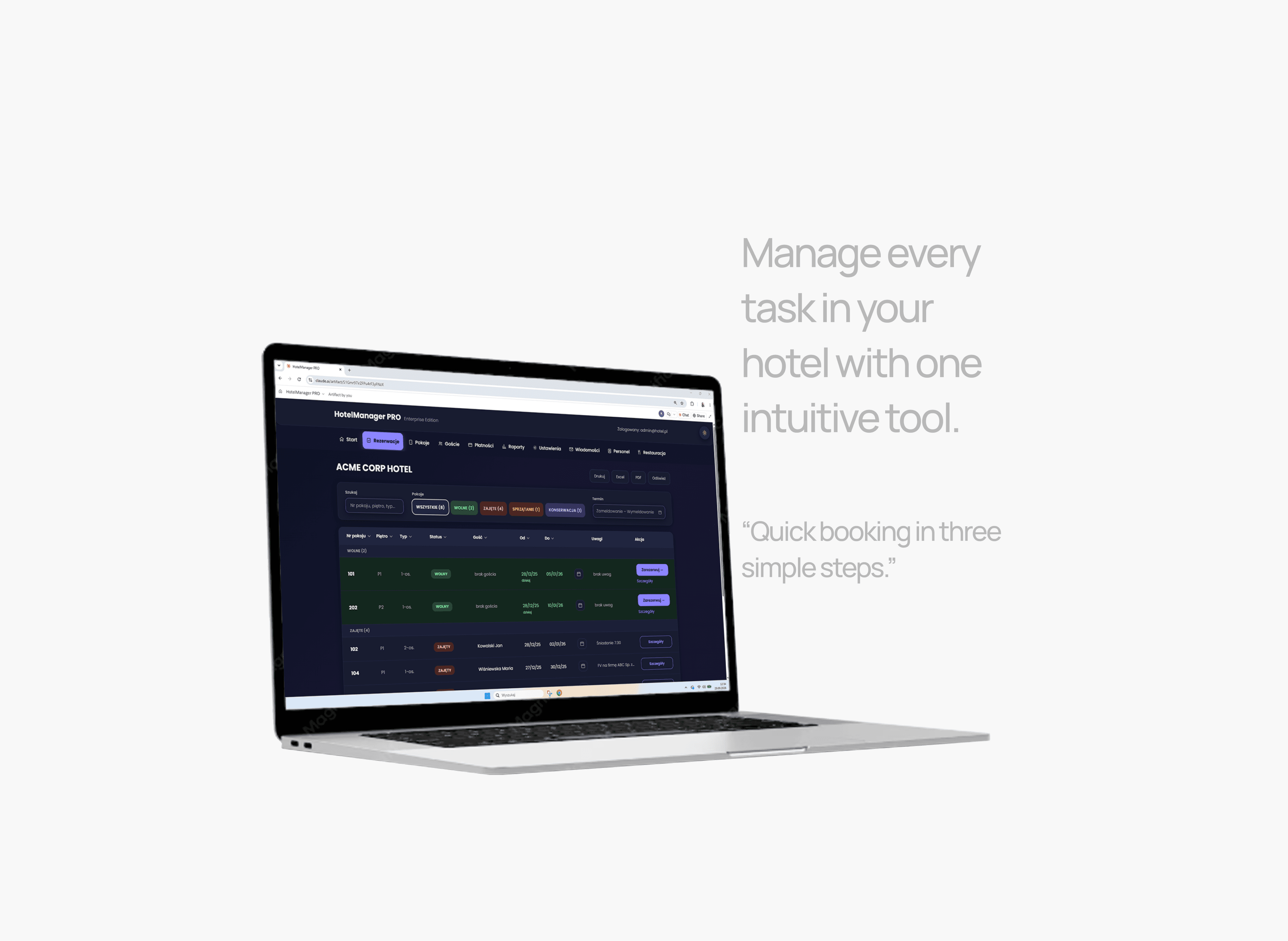
How has the user flow improved? In the final stage, I presented my solution, which addresses the identified issues and streamlines the main user flow. Receptionists can now quickly find an available room and book it intuitively using the new version of HotelManager PRO.
Improvements
Available rooms shown by default: available rooms now appear at the top of the list by default, but they can also be filtered by status or sorted in the table by a selected criterion
Visible occupancy: room occupancy is shown both in the bar above the table and in the table itself
Quick date search: an available room can be found by dates using the "Dates" field, with a date range selected from the calendar
Availability of a specific room: it can be checked in the table row or in the calendar without leaving the table view
Quick booking: reservations are made with a button placed in the table (embedded in the context of the task) in the row of a specific room, where the receptionist can immediately check and select dates from the available days
Outcome
The steps of the reservation process have been merged into one smooth flow.
After quickly finding an available room and checking its available dates directly in the table, the receptionist clicks the clearly visible, intuitively placed "Book" button assigned to that room. Then, by clicking the "Dates" field, they select the stay dates from the available days, which are displayed right away.
Link to the prototype:


Project Learnings
What did I take away from this challenge? This design challenge gave me the opportunity to test how AI tools can support the entire design process, from usability analysis to a functional prototype. The limited time allowed me to challenge myself and see how quickly I can turn my analysis into a working solution.
Takeaways
Things I learned
Orchestrating AI tools. I learned how to integrate Claude connected with Figma into my workflow: steering the model, enforcing corrections and staying in control of design decisions instead of accepting the first output.
Communicating design intent to AI. Combining text prompts with uploaded screenshots and sketches helped me convey my ideas more precisely than words alone.
Prioritizing under time pressure. I learned to focus on the issues that most affected the receptionist's main task and leave less critical improvements for later.
Reflections
Design judgment comes first. AI significantly speeds up building, but the quality of the result still depends on a solid analysis and a clear rationale behind every decision.
Looking back, I would…
Real-world validation. I regret that I didn't have the chance to test the new flow with real users to confirm whether my solution is clear to them and truly saves time in their everyday work.